Skip to content

The best MIDI controller for a laptop

A controller makes no sound of its own. What you are buying is the surface: pads, knobs, faders, and how quickly they line up with your software.

Pads first

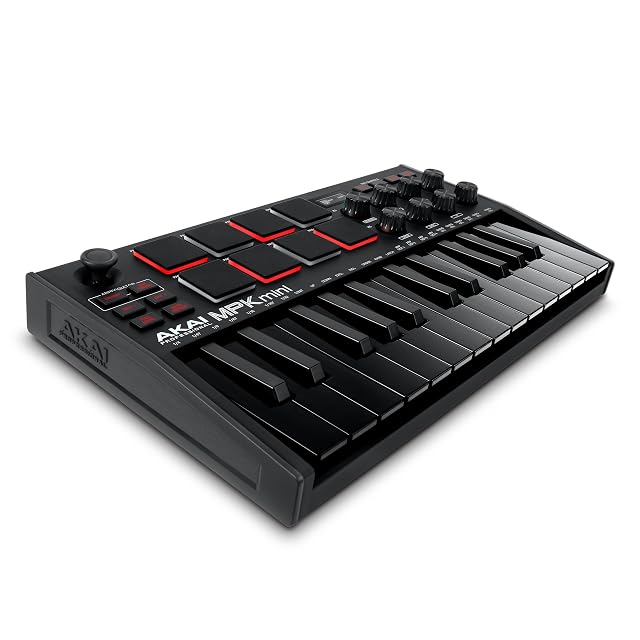
The Akai MPK Mini MK3 has dominated this category for a decade because of eight backlit MPC pads with Note Repeat and Full Level. Its eight knobs are endless encoders, so loading a preset does not leave a physical knob lying about the value.

Faders and two hands

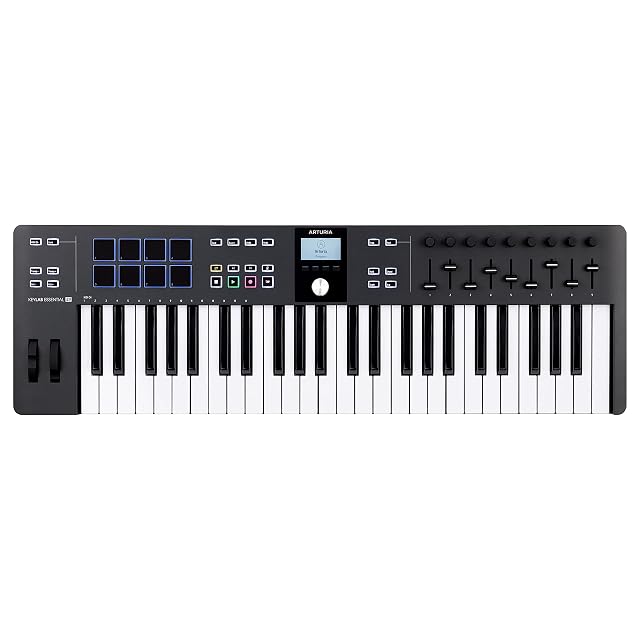
The Arturia KeyLab Essential 49 mk3 is where a controller becomes a mixing surface: 49 keys for two-handed playing, nine knobs and nine faders that map to channel levels, real pitch and modulation wheels, and Chord Play and scale modes for people whose ideas run ahead of their theory.

The smallest useful thing

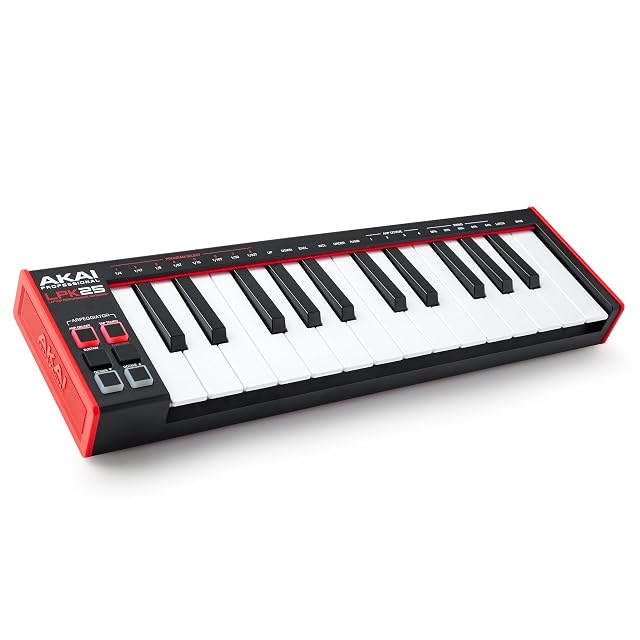
The Akai LPK25 is 25 mini keys, octave buttons, a sustain button, an arpeggiator with clock and eight preset slots. No pads, no knobs. It fits in a laptop bag, which is its entire argument.

What we would not do

We would not buy 25 keys expecting to play with two hands. Below 49 keys you are entering parts; from 49 you are playing them.

Which instrument fits how you play?

You compose with software instruments
Key feel and the number of keys matter most, and controls come second.
You make beats
Pads and their feel matter more than the keyboard, and small key counts are fine.
You travel with the laptop
Bus power and size decide whether it comes with you or stays at home.
You already have a digital piano
It probably works as a controller already, and a small pad or knob unit adds what is missing.

Picking by how you play

Playing software instruments

The core use. Key feel and range decide how musical the result is, and both are personal.

Programming drums

Pads, their sensitivity and their layout. A keyboard is a poor substitute for finger drumming.

Mixing and controlling parameters

Knobs and faders that map reliably. What matters is whether the mapping is automatic in your software.

Traveling

A compact bus-powered unit. Anything needing a separate power supply stays on the desk.

The things you will notice while playing

Number and size of keys
Full-size keys and enough range for two hands, or a compact unit for portability. It is the first decision and it is about how you work.
Key action
Synth action, semi-weighted or fully weighted. It changes what feels natural to play far more than any control does.
Pads, if you use them
Their sensitivity and spacing decide whether finger drumming works. Poor pads are worse than no pads.
Integration with your software
A controller that maps automatically saves hours. One that needs manual mapping for everything gets used less.
Bus power and size
The practical criteria for laptop use. A controller that needs a power supply and a bag of its own tends to stay at home.

Which figure for which playing

What you doWhat to prioritizeWhat to skip
Compose with instrumentsKeys and actionFaders
Make beatsPadsKey range
Mix in softwareKnobs and fadersWeighted keys
Work on the moveBus power and sizeAnything large

The mistakes players make

Buying the largest controller for a laptop
A big keyboard that never leaves the desk is fine if that is where you work. If you meant to be portable, it defeats the point.
Ignoring key action
It decides what feels natural. A cheap unweighted action can make playing anything expressive frustrating.
Assuming controls will map themselves
Integration varies enormously between software. A controller designed for your software saves real time.
Buying pads you will not use
Pads add cost and width. If you play keys and never program drums, the space is better spent on keys.

By the musician you are

The composer
Keys and action first, enough range for two hands, and controls as a bonus.
The beat maker
Good pads, a small key count, and a compact footprint.
The traveler
Bus powered, small, and something that fits in the same bag as the laptop.

Care, keys and how long it stays good

Controllers are simple and their failures are the USB socket, the cable and dust under the keys. The socket is soldered to the board and it is what fails first on units that travel.

  • Support the USB cable so it does not lever on the socket.
  • Cover the controller when not in use; dust under keys and pads is the usual fault.
  • Keep drinks away from the surface.
  • Carry it in a padded sleeve rather than loose in a bag.

Safety

Very low risk equipment, with the usual cautions about listening levels.

  • Set safe headphone levels when playing software instruments.
  • Route the USB cable so it cannot pull the laptop off the desk.
  • Avoid connecting or disconnecting while monitoring at high level.
  • Take breaks: long sessions at a controller strain wrists like any keyboard.

The choices, and the reasoning

  1. Akai Professional LPK25

    25 mini keys · arpeggiator · 8 preset slots · USB powered

    The smallest way to get keys next to a laptop: 25 responsive mini keys, octave buttons, a sustain button, a built-in arpeggiator with clock, and eight programmable preset slots.

    Best for: Writing parts on a laptop, on a desk with no room for anything larger.

    7.2/10

    ≈ $59

The questions players ask

Will a controller make a sound on its own?

No. It sends notes to software and the computer makes the sound. If you want an instrument that works with nothing attached, you want a keyboard, not a controller.

Are mini keys a problem?

For entering parts and chords, no. For practicing piano technique, yes — the spacing is smaller than standard and the habits do not transfer cleanly.

How many keys do I need?

Enough range for two hands if you compose; far fewer if you mainly program. It is the first decision and it follows how you work.

Do I need weighted keys?

Not for a controller unless you play piano parts. Synth action is lighter, faster and more portable, and many people prefer it for programming.

Are pads worth it?

If you program drums by hand, yes, and their quality matters. If you do not, they add cost and width for nothing.

Will it work with my software?

Most controllers send standard MIDI, so basic use always works. Automatic mapping of knobs and transport varies a great deal and is worth checking.

Does it need a power supply?

Most compact controllers are bus powered from USB. Larger ones may not be, and that changes how portable they really are.

Can I use my digital piano instead?

Usually yes, over USB or MIDI. Adding a small pad or knob unit then covers what the piano does not do.

Each instrument, and the player it answers

Akai Professional MPK Mini MK3

For players who: Beat making and production on a laptop, where pads matter as much as keys.
Its finest point: Eight MPC pads are the reason this controller has dominated its category for a decade

Its weakest point: A thumbstick is not a pitch wheel, and players coming from keyboards notice

Read the full review →

Arturia KeyLab Essential 49 mk3

For players who: A permanent desk setup where the controller is also the mixing surface.

Its finest point: Nine faders is a mixer under your hands, which no mini controller offers

Its weakest point: It occupies a desk — this is not a laptop-bag controller

Read the full review →

Akai Professional LPK25 · $59

For players who: Writing parts on a laptop, on a desk with no room for anything larger.

Its finest point: Fits in a laptop bag, which is the entire argument for a 25-key controller

Its weakest point: Mini keys teach a spacing that a full-size keyboard does not have

Read the full review →

What to get with it

Stands, pedals and cables from the same aisle, at the price we read. Confirm they suit the instrument you choose before ordering: it turns on the fitting and the part number, which the product page gives.

  • AODSK AS-WKBS · Keyboard stands & pedals — Solid wood · fixed 25.2 in high · 45.67 in long · depth 8.66–12 in · 76–88 keys
  • AODSK AS-ZK · Keyboard stands & pedals — Z-frame · height 21.2–32.4 in · width 21.8–35.2 in · 61–88 keys · no tools
  • CME C2MIDI Pro · Cables & adapters — USB-C MIDI · 32-bit processor · filter, map, route · works with no computer
  • Cyberguys! 190 0027 · Cables & adapters — 3.5 mm (0.14 in) TRS to 6.35 mm (0.25 in) TRS · 3.3 ft · oxygen-free copper · braided
  • CAHAYA Triple-Brace Music Stand · Music stands & lights — Metal · triple brace · 78–170 cm (30.7 to 66.9 in) · folds · $88
  • K KASONIC 2-in-1 Music Stand · Music stands & lights — Folding · sheet clamp · carry bag included · $20

If you want one line

What stands behind this ranking

What is listed is taken from the catalog of this site. Specifications come from the manufacturer and from the Amazon listing; prices are what Keepa reported on the date shown, and both move. The order follows declared specifications, stated strengths against stated limits, and price. Nothing here has been played or recorded with by us, and no page pretends otherwise.

Last checked on

Prices quoted in these summaries are dated readings. The live price is shown next to each product.

The tool we use ourselves

Chosen your instrument? Now buy it at the right price.

Digital pianos and electronic drum kits swing by a hundred dollars or more across the year, and the biggest "discounts" often land at prices the same model sold for six weeks earlier. UniverTrack tracks the real price history across retailers, spots fake reductions, and alerts you when it is genuinely the moment to buy.

Real price historyBuy-now alertsAI buying assistant
Try free for 14 days →
No commitment · Cancel in one click · 5 languages