Skip to content

The best beginner keyboard

Keyboards split on one line: accompaniment styles, or none. Yamaha builds around them; Casio removes them entirely. Neither is a compromise of the other.

Styles, or no styles

The PSR-E383 is first because it publishes what the others do not: 48-note polyphony, 650 sounds, 260 accompaniment styles, and a structured lesson path with 125 songs. Smart Chord means one finger produces a full chord, so songs sound finished long before the left hand is.

The Casio CT-S1 is the opposite instrument and it is deliberate: Casio states there is no auto-accompaniment at all. Sixty-one sounds, a 2 × 2.5 W speaker system, and the space spent on the keys and the cabinet instead.

The floor

The PSR-F52 exists to be better than a toy: 61 full-size keys from Yamaha at a price where 32 mini keys is the norm. Its listing does not state touch sensitivity, and this site does not fill that gap in — if dynamics matter, the PSR-E383 states them explicitly.

What we would not do

We would not buy mini keys for an adult or a teenager. Full-size spacing is what transfers to every other instrument; mini keys teach distances that have to be unlearned.

Which instrument fits how you play?

You want to learn piano properly
A digital piano with weighted keys is the instrument, and a keyboard will hold you back.
You want to explore sounds and songs
An arranger keyboard is exactly that, and it is far cheaper and lighter.
You are buying for a child
Weight, size and whether it can be plugged into headphones matter more than the sound list.
You are unsure how far it will go
A keyboard is the low-commitment entry, and touch-sensitive keys keep the door open.

Picking by how you play

First steps in music

Learning notes, simple pieces and how a keyboard is laid out. A keyboard does this perfectly well.

Playing songs with accompaniment

The arranger features are the point of the format, and they make playing alone sound complete.

Portability

Light, battery capable on many models, and easy to move. That is a genuine advantage over a piano.

Bridging to a digital piano

A keyboard with touch-sensitive keys teaches dynamics, which makes the transition later far less abrupt.

The things you will notice while playing

Touch sensitivity
Whether pressing harder makes a louder note. Without it, you cannot learn dynamics, and that is a real limitation rather than a refinement.
Key size
Full-size keys transfer to a piano; mini keys do not. For anyone who might progress, full size matters.
Number of keys
Fewer keys means transposing or running out of range. It is the constraint that shows up first as pieces get longer.
Headphone output
The feature that makes practice possible in a shared home, and the one parents value most.
Power and stand
Many keyboards ship without a stand or a power supply. Checking that avoids a disappointing first evening.

Which figure for which playing

Your aimKeyboardThe alternative
Learn piano techniqueNot suitableA weighted digital piano
Explore music and songsIdealNone cheaper
Buying for a childFull-size touch-sensitive keysMini keys, which do not transfer
PortabilityVery goodA slab piano is heavier

The mistakes players make

Buying mini keys for someone who may progress
Mini keys do not transfer to a piano. For a young child they can be right; for anyone likely to continue, full size avoids relearning.
Choosing on the number of sounds
Beginners use a handful. The sound count says nothing about whether the instrument helps you learn.
Ignoring touch sensitivity
Without it, every note is the same volume. Dynamics are part of music, not an advanced feature.
Forgetting the stand and the power supply
Many keyboards omit both. A keyboard on a bed at the wrong height gets played once.

By the musician you are

The curious beginner
A touch-sensitive keyboard with full-size keys and headphones. Low commitment, real capability.
The child
Size, weight and headphones. Whether the instrument is fun decides whether it is used.
The future pianist
Skip the keyboard and buy weighted keys, because the touch is the part that has to be learned.

Care, keys and how long it stays good

Keyboards are robust and their common failures are mundane: a stuck key from crumbs or spilled drink, and a power supply that goes missing. Both are avoidable rather than repairable.

  • Keep food and drink away from the keys.
  • Cover it when not in use: dust under the keys is the usual cause of a dead note.
  • Keep the power supply with the instrument; replacements are model-specific.
  • Remove batteries for long storage if the keyboard takes them.

Safety

A light instrument on a stand, often used by children.

  • Use a stable stand at the right height, and check it is locked before playing.
  • Set safe headphone levels, especially for a child.
  • Route cables where they cannot be pulled or tripped over.
  • Keep the instrument away from the edge of a table where it can be knocked off.

The choices, and the reasoning

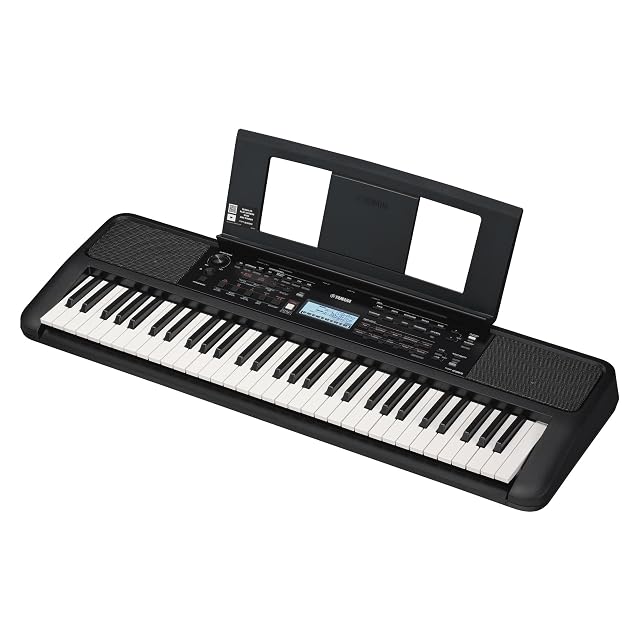
  1. Yamaha PSR-E383

    61 touch-sensitive keys · 650 sounds · 260 styles · 48-note polyphony

    The arranger answer to the Casio: 650 sounds, 260 accompaniment styles, 48-note polyphony and a structured lesson system with 125 built-in songs.

    Best for: A beginner who wants to play songs with accompaniment from the first week.
    7.8/10

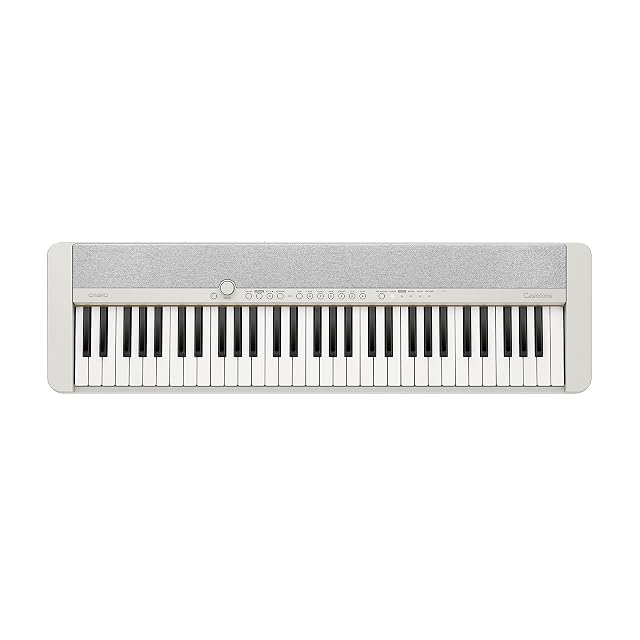
  2. Casio Casiotone CT-S1

    61 touch-sensitive keys · 61 sounds · no auto-accompaniment

    A keyboard built like a piano rather than like an arranger: 61 touch-sensitive keys, 61 sounds, and deliberately no accompaniment styles. Music rest and power adapter are included; the pedal is not.

    Best for: Someone who wants piano sounds and 61 keys without an arranger’s menus.

    7.8/10

    ≈ $560

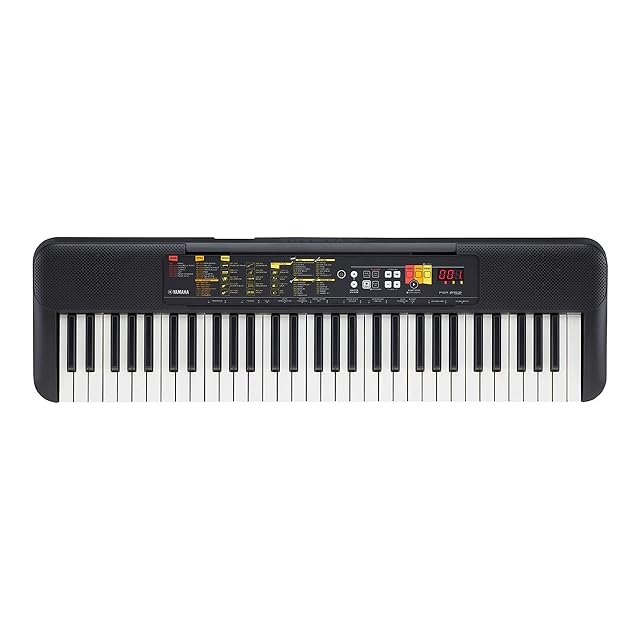
  3. Yamaha PSR-F52

    61 keys · 144 sounds · 158 styles

    The simplest instrument in this group: 61 full-size keys, 144 sounds and 158 accompaniment styles, at a price where the alternative is usually a toy with 32 small keys.

    Best for: A first keyboard for a child, or a second one to leave at a grandparent’s house.

    7.2/10

The questions players ask

Are 61 keys enough?

For pop, songwriting and a first year of lessons, yes. Classical piano repertoire runs off the end of them, which is when 76 or 88 becomes the question.

Touch-sensitive or not?

Touch sensitivity changes volume with how hard you play, and it is what makes playing expressive. Two of these three state it; the third does not, and we do not assume it.

Is a keyboard enough to learn piano?

For the first steps yes, but the touch of a piano is part of the technique. A weighted digital piano is the instrument for learning piano properly.

What is touch sensitivity?

Whether pressing harder produces a louder note. Without it you cannot learn dynamics, which is a real limitation rather than a refinement.

Mini keys or full size?

Full size for anyone who might progress, because mini keys do not transfer to a piano. Mini keys can suit a very young child.

Does it come with a stand?

Often not, nor a power supply. Both are worth checking, because a keyboard at the wrong height is a keyboard that is not used.

Can I use it with a computer?

Most have USB or MIDI, which lets them act as a controller. Few beginners use this at first and it costs nothing to have.

Each instrument, and the player it answers

Yamaha PSR-E383

For players who: A beginner who wants to play songs with accompaniment from the first week.
Its finest point: Polyphony is stated — 48 notes — where most keyboards at this price stay silent about it

Its weakest point: 48-note polyphony is enough for this repertoire and will run out under heavy sustain

Read the full review →

Casiotone CT-S1 · $560

For players who: Someone who wants piano sounds and 61 keys without an arranger’s menus.

Its finest point: A short, curated sound list rather than hundreds of variations nobody uses

Its weakest point: No auto-accompaniment at all: if you wanted a backing band, this is the wrong instrument

Read the full review →

Yamaha PSR-F52

For players who: A first keyboard for a child, or a second one to leave at a grandparent’s house.

Its finest point: 61 full-size keys at a price where 32 mini keys are the norm

Its weakest point: The listing does not state touch sensitivity, so this page does not claim it

Read the full review →

What to get with it

Stands, pedals and cables from the same aisle, at the price we read. Confirm they suit the instrument you choose before ordering: it turns on the fitting and the part number, which the product page gives.

  • AODSK AS-WKBS · Keyboard stands & pedals — Solid wood · fixed 25.2 in high · 45.67 in long · depth 8.66–12 in · 76–88 keys
  • AODSK AS-ZK · Keyboard stands & pedals — Z-frame · height 21.2–32.4 in · width 21.8–35.2 in · 61–88 keys · no tools
  • CME C2MIDI Pro · Cables & adapters — USB-C MIDI · 32-bit processor · filter, map, route · works with no computer
  • Cyberguys! 190 0027 · Cables & adapters — 3.5 mm (0.14 in) TRS to 6.35 mm (0.25 in) TRS · 3.3 ft · oxygen-free copper · braided
  • CAHAYA Triple-Brace Music Stand · Music stands & lights — Metal · triple brace · 78–170 cm (30.7 to 66.9 in) · folds · $88
  • K KASONIC 2-in-1 Music Stand · Music stands & lights — Folding · sheet clamp · carry bag included · $20

If you want one line

Comparisons worth hearing out

Instrument against instrument, where that page is already written.

What stands behind this ranking

What is listed is taken from the catalog of this site. Specifications come from the manufacturer and from the Amazon listing; prices are what Keepa reported on the date shown, and both move. The order follows declared specifications, stated strengths against stated limits, and price. Nothing here has been played or recorded with by us, and no page pretends otherwise.

Last checked on

Prices quoted in these summaries are dated readings. The live price is shown next to each product.

The tool we use ourselves

Chosen your instrument? Now buy it at the right price.

Digital pianos and electronic drum kits swing by a hundred dollars or more across the year, and the biggest "discounts" often land at prices the same model sold for six weeks earlier. UniverTrack tracks the real price history across retailers, spots fake reductions, and alerts you when it is genuinely the moment to buy.

Real price historyBuy-now alertsAI buying assistant
Try free for 14 days →
No commitment · Cancel in one click · 5 languages