Skip to content

The best studio monitors for a small room

In a small room a bigger woofer is not automatically better: it puts energy into frequencies the walls exaggerate. Room compensation matters more than size.

Small on purpose

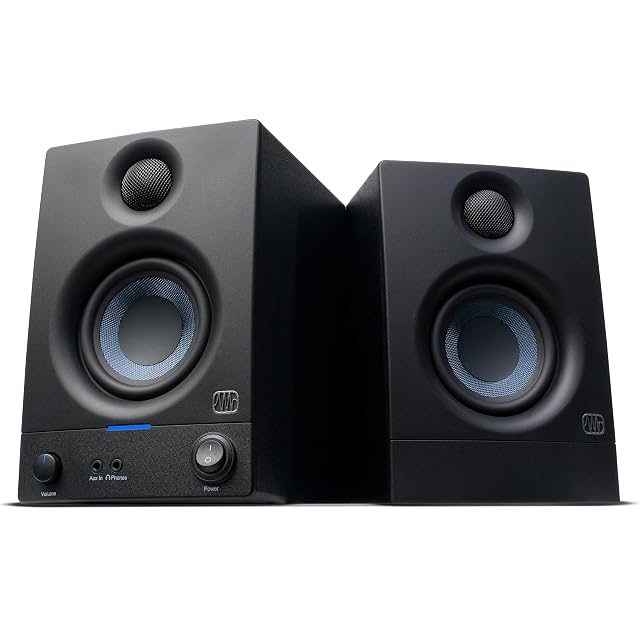
The PreSonus Eris 3.5 is first for a desk: 3.5-inch woofers, 50 W, a published 80 Hz – 20 kHz response, acoustic tuning controls, and a headphone socket on the front panel where you can reach it.

When the desk is against a wall

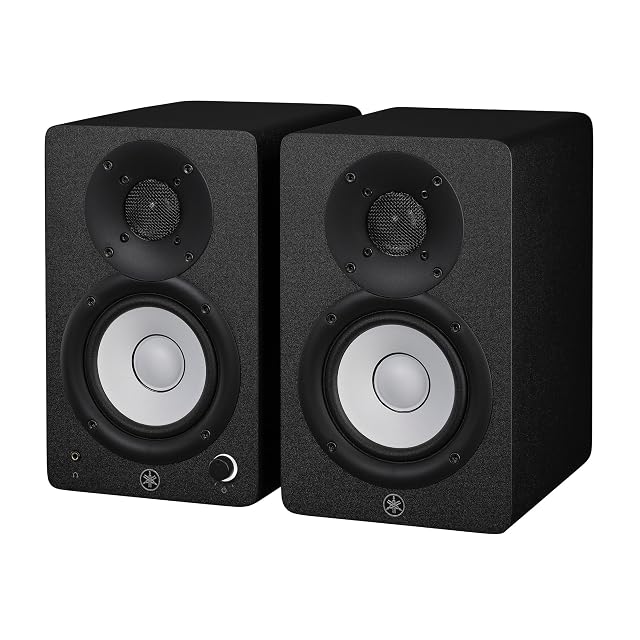
The Yamaha HS4 publishes 60 Hz – 22 kHz and 102 dB SPL, and its back panel has ROOM CONTROL and HIGH TRIM — the settings that compensate for the wall behind the speakers, which is where nearly every home studio actually sits.

Everything in the box

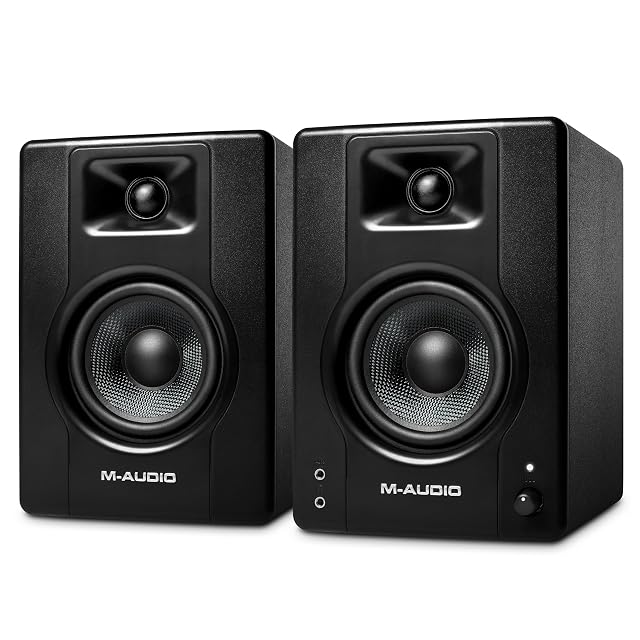
The M-Audio BX4 arrives with every cable, the foam feet that decouple the cabinets from the desk, and MPC Beats. M-Audio does not publish a frequency response for it, and this site does not invent one.

What we would not do

We would not buy 5-inch monitors for an untreated bedroom. The extra low end is exactly what the room will exaggerate, and the result is less accurate, not more.

Which instrument fits how you play?

Your room is small and untreated
Smaller monitors and a little treatment beat large monitors every time.
You sit close to the speakers
Nearfield monitors are designed for exactly that, and larger drivers do not integrate at short distances.
You cannot treat the room
Headphones will be more reliable, and the monitors become a second opinion.
You have neighbors
Monitors at useful level are audible next door; headphones are what makes evening work possible.

Picking by how you play

Mixing at a desk

The core use, and the one nearfield monitors are designed around. Distance and positioning matter more than size.

Listening while composing

Where comfort and a lack of fatigue matter more than absolute accuracy.

Checking bass

The hardest thing in a small room. A subwoofer often makes it worse rather than better without treatment.

Playing instruments through them

Possible, and a reason to have monitors at all if you use software instruments.

The things you will notice while playing

Size relative to the room
Larger monitors in a small room excite modes and give a bass response that is worse, not better. Smaller is genuinely the right answer here.
Placement and what it demands
Symmetry, distance from walls and an equilateral triangle with your head. Placement changes the sound more than the monitors do.
Port position
Rear-ported monitors need space behind them. In a small room against a wall, front-ported designs are far more forgiving.
Room treatment budget
The uncomfortable truth: money spent on absorption at the first reflection points does more than the same money on speakers.
Level matching and a way to reference
The ability to switch between monitors and headphones, and to check on something ordinary, is worth more than a specification.

Which figure for which playing

Your roomWhat to doWhat not to do
Small and untreatedSmall monitors and absorptionBuy larger monitors
Against a wallFront-ported designRear ports in a corner
Shared buildingHeadphones for eveningsMix loud at night
Asymmetric layoutFix the symmetry firstCompensate with EQ

The mistakes players make

Buying bigger monitors for a small room
More bass energy in a small room excites room modes. The result is a less accurate low end, not a better one.
Ignoring placement
Speaker position and listening position change the response dramatically. Both are free to adjust and both matter more than the model.
Adding a subwoofer to fix the bass
In an untreated small room a subwoofer usually adds to the problem. Treatment comes first, then the question can be revisited.
Mixing loud
Loud flatters everything and tires your ears within an hour. Decisions made at moderate level hold up better.

By the musician you are

The small bedroom studio
Small monitors, careful placement and absorption at the first reflection points. In that order.
The flat with neighbors
Headphones as the main tool, monitors as a check at reasonable hours.
The treated room
Here monitor choice starts to matter, because the room is no longer the dominant variable.

Care, keys and how long it stays good

Monitors are stable equipment whose failures are usually in cables and in the amplifier’s environment. Dust in ports and heat behind a desk shorten life quietly, and a hum is almost always a cable or an earthing question rather than a fault.

  • Keep the rear panel ventilated: active monitors run warm behind a desk.
  • Use balanced cables where the interface supports them: it removes most hum problems.
  • Keep ports free of dust, and never poke anything into them.
  • Power monitors on last and off first, to avoid switch-on thumps.

Safety

Loud speakers close to your head and a stand or shelf holding real weight.

  • Turn monitors on after everything else and off before, to avoid loud transients.
  • Mount monitors on stands or a shelf rated for their weight.
  • Keep listening levels moderate: fatigue is a hearing risk as much as a mixing one.
  • Route power and audio cables so they cannot pull a monitor off a stand.

The choices, and the reasoning

  1. PreSonus Eris 3.5 Gen 2

    Pair · 3.5" woofer · 50 W · front headphone jack

    The desktop pair: 3.5-inch woven composite woofers, 1-inch silk dome tweeters, 50 W total, 80 Hz – 20 kHz, with acoustic tuning controls and a headphone socket on the front panel.

    Best for: A desk where space is the binding constraint and headphones are the main tool anyway.

    7.2/10

    ≈ $260

  2. Yamaha HS4

    Pair · 4.5" woofer · 60 Hz – 22 kHz · room control

    Sold as a pair, unlike much of this category: 2-way bass-reflex monitors with a 4.5-inch woofer, a stated 60 Hz – 22 kHz response, 102 dB SPL maximum, and ROOM CONTROL and HIGH TRIM switches on the back.

    Best for: A small room where the speakers have to sit near a wall.

    8.4/10

  3. M-Audio BX4

    Pair · 4.5" Kevlar woofer · rear 6.3/3.5/RCA · front aux

    A bi-amplified desktop pair with 4.5-inch black Kevlar woofers and silk dome tweeters, in MDF cabinets, with three rear input types, front-panel aux and rear high/low EQ.

    Best for: A first pair of desktop monitors where nothing else should have to be bought.

    7.8/10

    ≈ $140

The questions players ask

Are monitors sold in pairs?

Not always, and this is the most common mistake in the category. Professional monitors are conventionally sold one at a time using a photograph of two. All three pairs here are stated as pairs.

Can I mix on small monitors?

Above their stated low limit, yes. The Eris 3.5 states 80 Hz; below that, decisions have to be checked on headphones or another system.

What size monitors for a small room?

Smaller than instinct suggests. Large monitors excite room modes in a small space and give a less accurate low end, not a better one.

Does placement really matter that much?

More than the model. Symmetry, distance from walls and an equilateral triangle with your head change the sound dramatically and cost nothing.

Should I add a subwoofer?

Not in an untreated small room. It usually adds to the problem; treatment first, then the question is worth revisiting.

Monitors or headphones for mixing?

In an untreated room, headphones are often more reliable. Monitors become the second opinion until the room is treated.

Why do my mixes sound different in the car?

Mostly the room. Learning how your setup translates, and checking on ordinary systems, is part of the process rather than a fault.

Do I need expensive cables?

No, but balanced cables where your interface supports them remove most hum problems, which is a real and audible difference.

Each instrument, and the player it answers

PreSonus Eris 3.5 Gen 2 · $260

For players who: A desk where space is the binding constraint and headphones are the main tool anyway.

Its finest point: A headphone socket on the front, so the speakers and the headphones share one source

Its weakest point: 80 Hz is a high starting point — bass decisions need checking elsewhere

Read the full review →

Yamaha HS4

For players who: A small room where the speakers have to sit near a wall.

Its finest point: ROOM CONTROL is the setting that makes a monitor usable against a wall, which is where most desks are

Its weakest point: A 4.5-inch woofer reaches 60 Hz — the bottom octave is not there, by design

Read the full review →

M-Audio BX4 · $140

For players who: A first pair of desktop monitors where nothing else should have to be bought.

Its finest point: Every cable needed is in the box, including the foam feet that decouple them from a desk

Its weakest point: One speaker is passive and driven by the other — the pair must stay cabled together

Read the full review →

What to get with it

Stands, pedals and cables from the same aisle, at the price we read. Confirm they suit the instrument you choose before ordering: it turns on the fitting and the part number, which the product page gives.

  • AudioSilk Room Kit, Natural · Acoustic treatment — 4 panels at 46 × 23 in · recycled polyester, not foam · removable strips, sold separately
  • DMSKY 18-pack 12 × 12 in · Acoustic treatment — 18 panels · 12 × 12 × 0.4 in · polyester fiber, not foam · 45° chamfered edges
  • CME C2MIDI Pro · Cables & adapters — USB-C MIDI · 32-bit processor · filter, map, route · works with no computer
  • Cyberguys! 190 0027 · Cables & adapters — 3.5 mm (0.14 in) TRS to 6.35 mm (0.25 in) TRS · 3.3 ft · oxygen-free copper · braided

If you want one line

  • If what you want first is the price → look at M-Audio BX4
  • If what you want first is our rating → look at Yamaha HS4

What stands behind this ranking

What is listed is taken from the catalog of this site. Specifications come from the manufacturer and from the Amazon listing; prices are what Keepa reported on the date shown, and both move. The order follows declared specifications, stated strengths against stated limits, and price. Nothing here has been played or recorded with by us, and no page pretends otherwise.

Last checked on

Prices quoted in these summaries are dated readings. The live price is shown next to each product.

The tool we use ourselves

Chosen your instrument? Now buy it at the right price.

Digital pianos and electronic drum kits swing by a hundred dollars or more across the year, and the biggest "discounts" often land at prices the same model sold for six weeks earlier. UniverTrack tracks the real price history across retailers, spots fake reductions, and alerts you when it is genuinely the moment to buy.

Real price historyBuy-now alertsAI buying assistant
Try free for 14 days →
No commitment · Cancel in one click · 5 languages