Skip to content

The best audio interface under $200

Count what you record at the same moment, not how many holes are on the front. One preamp records one microphone, whatever else the panel suggests.

Two preamps or one

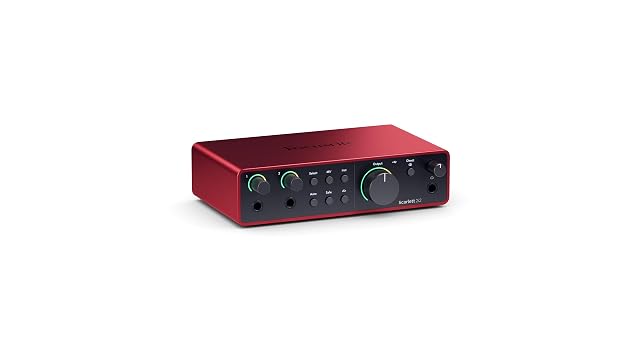
The Scarlett 2i2 is first because it is the only one here that records two microphones at once — a singer who plays, two voices, a stereo pair. Auto Gain and Clip Safe are aimed squarely at beginners, and the software bundle is a working studio rather than a demo.

The honest floor

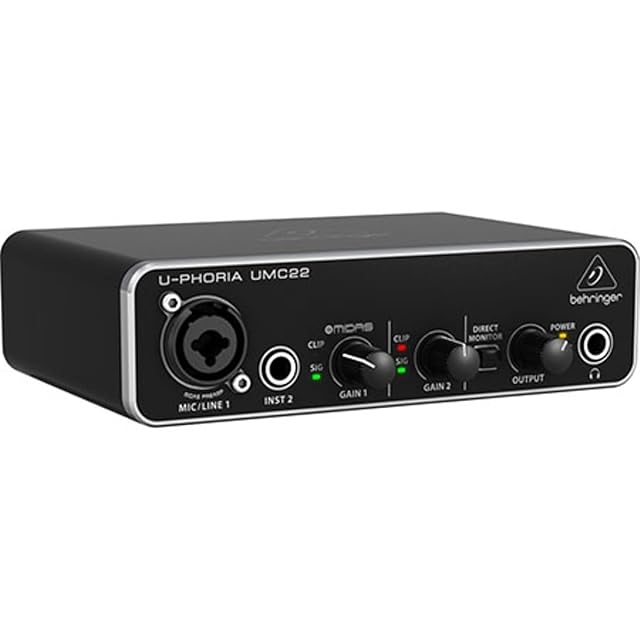
The Behringer UMC22 does one microphone and one instrument, at 48 kHz, with a Midas-designed preamp and a mix control for direct monitoring. It costs about a third of the Focusrite and nothing about it is a trap.

When the sockets decide

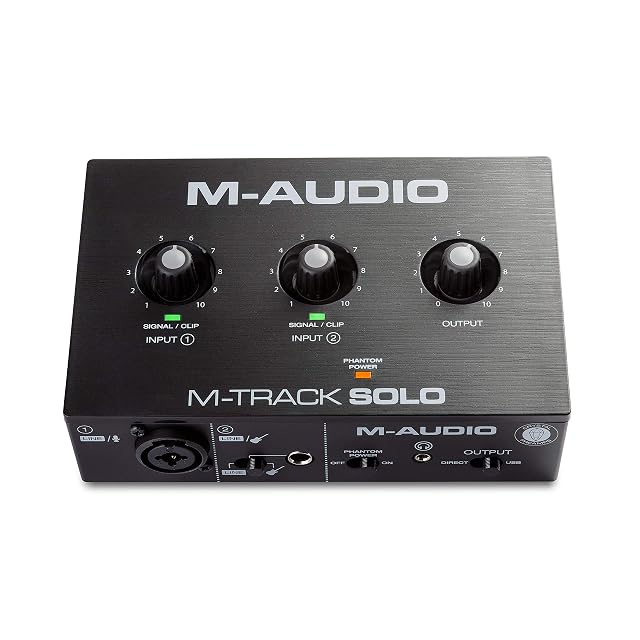
The M-Audio M-Track Solo has RCA outputs, which suit desktop powered speakers that have no balanced inputs. Its headphone socket is 3.5 mm (0.14 in), so budget for a 6.35 mm (0.25 in) adapter before the first session rather than during it.

What we would not do

We would not choose an interface on sample rate. Forty-eight kilohertz is what most released music is delivered at; the driver and the preamp decide the recording.

Which instrument fits how you play?

You record one thing at a time
Two inputs are enough, and more inputs mostly add cost you will not use.
You record voice and guitar together
You need two inputs recording simultaneously, which not every entry interface does.
You use a condenser microphone
Phantom power is essential and is not universal on the cheapest units.
You play live with software
Driver stability and latency matter more than the number of connectors.

Picking by how you play

Recording voice

One good preamp and phantom power. It is the commonest use and the least demanding on the interface.

Recording an instrument direct

A high-impedance input for guitar or bass. Without one, a guitar plugged into a microphone input sounds thin.

Two sources at once

Voice and guitar together needs two inputs that record on separate tracks, which is worth confirming.

Monitoring

Headphone output and direct monitoring, which is what lets you hear yourself without delay while recording.

The things you will notice while playing

Number of simultaneous inputs
Two connectors do not always mean two separate recording channels. Check that the interface records them independently.
Phantom power
Needed by most condenser microphones. Not every entry-level interface supplies it, and it is the specification most often assumed.
A dedicated instrument input
High impedance for guitar and bass. Plugging an instrument into a microphone input gives a weak, thin sound that no plugin fixes.
Driver quality and latency
The part you experience daily and the part no one publishes usefully. Stable drivers matter more than converter specifications at this level.
Headphone output quality
You will listen through it constantly. A weak headphone amp makes monitoring unpleasant and inaccurate.

Which figure for which playing

What you recordWhat it needsWhat is optional
Voice onlyOne preamp with phantom powerA second input
Voice and guitar togetherTwo simultaneous inputsMIDI ports
Guitar directA high-impedance inputPhantom power
Live performanceStable drivers, low latencyExtra outputs

The mistakes players make

Assuming two sockets means two tracks
Some interfaces sum inputs or record only one at a time. If you plan to record two sources separately, that is a specification to confirm.
Buying without phantom power
Most condenser microphones need it. This is the commonest mismatch in a first recording setup.
Plugging a guitar into a microphone input
Impedance mismatch gives a thin, weak sound. The instrument input exists precisely for this.
Chasing converter specifications
At this level, driver stability, preamp quality and the room account for far more of the result than the numbers on the box.

By the musician you are

The voice recordist
One good preamp, phantom power and a decent headphone output. Nothing else is needed.
The singer-songwriter
Two simultaneous inputs and an instrument input, so voice and guitar can be captured together.
The producer
Driver stability and low latency, because you will be playing software instruments in real time.

Care, keys and how long it stays good

An interface is stable hardware whose problems are almost always software or cables. Drivers, USB ports and the leads between them account for the great majority of faults blamed on the interface itself.

  • Keep drivers current, and note which version worked if an update causes trouble.
  • Use the supplied cable or a known-good one: USB cables are a common and invisible fault.
  • Avoid unpowered hubs; connect directly to the computer where possible.
  • Keep the unit ventilated and away from drink.

Safety

The hazards here are to hearing and to connected equipment.

  • Switch phantom power off before connecting or disconnecting microphones.
  • Lower monitoring levels before changing connections; a plug pop through headphones is very loud.
  • Do not send phantom power to equipment not designed to receive it.
  • Set headphone levels conservatively for long sessions.

The choices, and the reasoning

  1. Behringer UMC22

    2×2 · Midas preamp · 48 kHz · USB powered

    The cheapest honest way into recording: one XLR/TRS combo input with a Midas-designed preamp, a separate instrument input, direct monitoring and USB power. Forty-eight kilohertz, and no pretense beyond it.

    Best for: A first interface for one voice or one instrument at a time.

    7.2/10

    ≈ $53

  2. M-Audio M-Track Solo

    48 kHz · combo XLR/line · RCA outputs · USB powered

    A compact 48 kHz interface with a combo XLR input carrying phantom power, a separate line/instrument input, RCA outputs and a USB/Direct switch for latency-free monitoring.

    Best for: A desktop setup feeding powered speakers through RCA rather than through balanced jacks.

    7.2/10

    ≈ $49

The questions players ask

Why does the driver matter more than the converters?

On Windows, a manufacturer-supplied low-latency driver is what lets you play in time with a recording. A generic driver leaves an audible delay that no setting inside the software removes.

What is direct monitoring?

Hearing your input straight from the interface rather than after a round trip through the computer. It is what removes the delay in your headphones, and all three of these have it.

How many inputs do I need?

Two if you ever record voice and instrument together; one is enough otherwise. More inputs mostly add cost at this level.

Do I need phantom power?

If you use a condenser microphone, yes. It is the specification most often assumed and most often missing on the cheapest units.

Why does my guitar sound thin?

Almost always because it is plugged into a microphone input rather than the instrument input. The impedance is wrong and no plugin corrects it.

What is latency and does it matter?

The delay between playing and hearing. It matters most when playing software instruments; direct monitoring solves it for recording.

Are more expensive converters worth it?

At this level, driver stability, preamp quality and your room account for far more of the sound than converter specifications.

Can I use an interface with a phone or tablet?

Many can, sometimes needing an adapter and enough power. It is worth checking specifically rather than assuming.

Each instrument, and the player it answers

Focusrite Scarlett 2i2 (4th Gen) · $220

For players who: Anyone who will ever record two things at the same time.

Its finest point: Two preamps: a voice and a guitar, or two singers, in the same take

Its weakest point: Roughly ninety dollars more than the Solo for a second preamp you may never use

Read the full review →

Behringer UMC22 · $53

For players who: A first interface for one voice or one instrument at a time.

Its finest point: Records a microphone and a guitar without any other purchase beyond cables

Its weakest point: 48 kHz is the ceiling here, where the Focusrite units go further

Read the full review →

M-Audio M-Track Solo · $49

For players who: A desktop setup feeding powered speakers through RCA rather than through balanced jacks.

Its finest point: RCA outputs suit desktop speakers that have no balanced inputs

Its weakest point: The headphone output is 3.5 mm (0.14 in), so 6.35 mm (0.25 in) studio headphones need an adapter

Read the full review →

What to get with it

Stands, pedals and cables from the same aisle, at the price we read. Confirm they suit the instrument you choose before ordering: it turns on the fitting and the part number, which the product page gives.

  • CME C2MIDI Pro · Cables & adapters — USB-C MIDI · 32-bit processor · filter, map, route · works with no computer
  • Cyberguys! 190 0027 · Cables & adapters — 3.5 mm (0.14 in) TRS to 6.35 mm (0.25 in) TRS · 3.3 ft · oxygen-free copper · braided
  • CAHAYA 2-in-1 Boom Stand · Mic stands & arms — Floor stand · boom · 64–158 cm (25.2 to 62.2 in) · $78
  • InnoGear TS186 · Mic stands & arms — 71–228 cm (28 to 89.8 in) · boom adjustable 41–76 cm (16.1 to 29.9 in) · 360° on two axes · two clips and a bag
  • AudioSilk Room Kit, Natural · Acoustic treatment — 4 panels at 46 × 23 in · recycled polyester, not foam · removable strips, sold separately
  • DMSKY 18-pack 12 × 12 in · Acoustic treatment — 18 panels · 12 × 12 × 0.4 in · polyester fiber, not foam · 45° chamfered edges

If you want one line

Comparisons worth hearing out

Instrument against instrument, where that page is already written.

What stands behind this ranking

What is listed is taken from the catalog of this site. Specifications come from the manufacturer and from the Amazon listing; prices are what Keepa reported on the date shown, and both move. The order follows declared specifications, stated strengths against stated limits, and price. Nothing here has been played or recorded with by us, and no page pretends otherwise.

Last checked on

Prices quoted in these summaries are dated readings. The live price is shown next to each product.

The tool we use ourselves

Chosen your instrument? Now buy it at the right price.

Digital pianos and electronic drum kits swing by a hundred dollars or more across the year, and the biggest "discounts" often land at prices the same model sold for six weeks earlier. UniverTrack tracks the real price history across retailers, spots fake reductions, and alerts you when it is genuinely the moment to buy.

Real price historyBuy-now alertsAI buying assistant
Try free for 14 days →
No commitment · Cancel in one click · 5 languages